
- 复位向类型
- 在 .htaccess 中设置重写规则:使用案例
- 为 cPanel 账户中的所有网站启用 HTTPS 复位向
- 为特定网站禁用重写规则的应用
- 将单个网站从 http:// 复位向到 https:// 或 https://www
- 强制使用 'https://example.com' 或 'https://www.example.com'
- 强制使用 'http://' 或 'http://www.'
- 复位向到/从子域
- 将 http:// 复位向为 https:// 或 https://www,使用 CloudFlare 弹性 SSL 模式
- 为特定子活页夹启用 HTTPS
- 强制特定页面的 HTTPS
- 不论位置设置对特定文件名的复位向
- 部分复位向到 https://
- 如何在重写规则中指定复位向状态代码
一旦 SSL 证书安装完毕,并且网站可以通过 https:// 正确访问,您可能希望默认情况下使其可以通过 https:// 访问。换句话说,当用户在浏览器中输入 domain.com 时,应复位向到 https://domain.com 以安全访问网站。
在本文中,我们将介绍一些基本的 HTTPS 复位向类型,并展示如何使用 .htaccess 在 Cpanel 中强制 HTTPS。
如果您转到 cPanel >> '文件管理器',可以找到该文件。然后,找到您的网站的文文件根目录。对于主要的 cPanel 网域,该活页夹通常是 'public_html'。如果网站是附加域,您可以在 '附加域' 部分查找其文文件根目录。

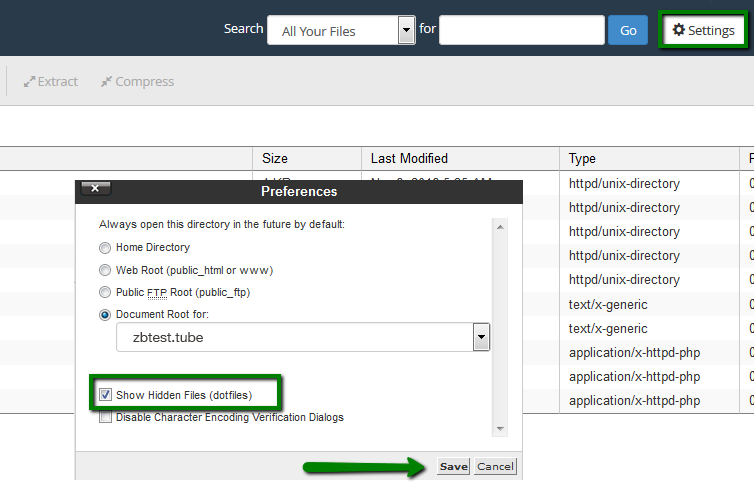
当您找到该活页夹时,.htaccess 文件 可能已经存在。要确认,请点击右上角的 '设置',并勾选 '显示隐藏文件(点文件)'。
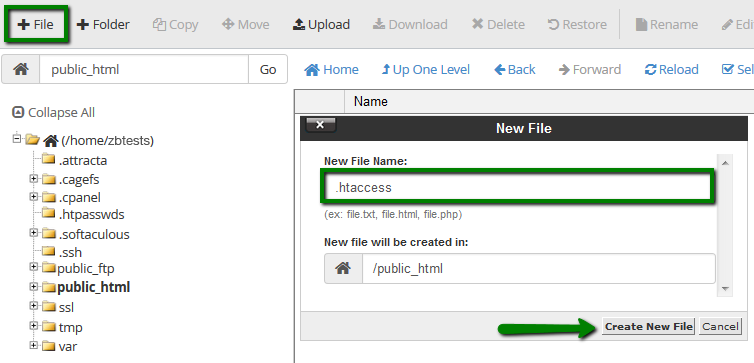
如果该文件未出现,可以通过点击 '+文件' 来创建它。请确保将文件命名为 '.htaccess',以点开头。
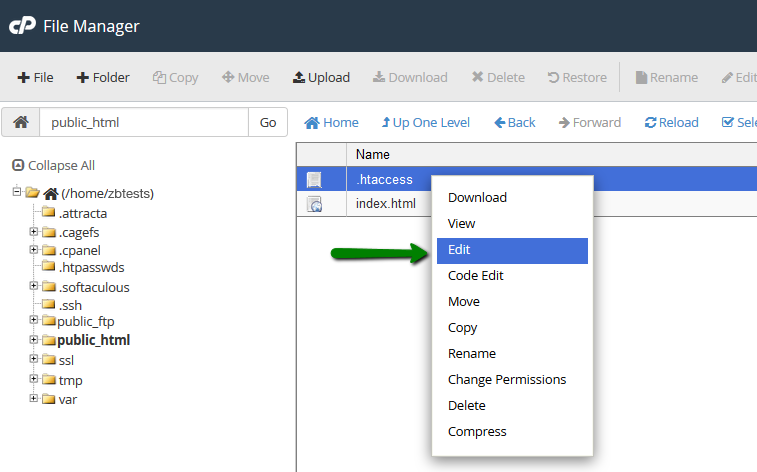
要打开该文件,右键单击它,然后点击 '编辑'。在弹出的窗口中,点击 '编辑'。
复位向类型
在设置重写规则时,了解有永久复位向类型和临时复位向类型是有用的。每种类型的处理方式在搜索引擎和网页浏览器上各不相同,并且具有自己的状态代码,可以在重写规则中明确指定:
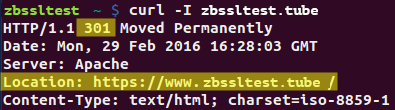
- 状态代码 301 '永久移动'(永久复位向)意味着所请求的资源永久移动到新位置,因此搜索引擎不应考虑之前位置的引用,并索引新位置。反之,网页浏览器将在缓存中存储新 URL,因此优先于初始 URL。
- 状态代码 302 '临时移动'(临时复位向)意味着该复位向在有限的时间内设置。在这种情况下,搜索引擎应将两个位置视为相同,因此初始位置仍然有效。相应地,浏览器不会缓存新 URL,并且每次请求初始 URL 时都会执行复位向。
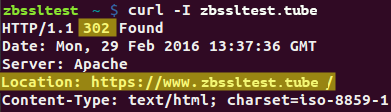
注意:长期启用 302 复位向可能会显著降低网站在搜索结果中的排名。在 HTTP-HTTPS 复位向的情况下,所有网站请求均在 http://domain.com 和 https://domain.com 之间分割,因为两者都被搜索引擎分别编入索引。因此,在大多数情况下,301 状态代码更适合用于 HTTP-HTTPS 复位向。
我们将在下一部分详细说明需要指定状态代码的位置。
在 .htaccess 中设置重写规则:使用案例
注意:下面指定的指令使用自己的语法。改变任何符号或字符可能导致重写规则无法正常工作或失败。为了保持清晰,我们已经用红色突出显示了可以修改的部分(主要是应该放置特定域名的地方)。
让我们概述一下从 HTTP 到 HTTPS 的复位向最常见的配置方式。
为 cPanel 的所有网站启用 HTTPS 复位向
注意:如果您的 .htaccess 中已经有一些代码,请将这一部分添加到相似前缀的规则上方。
要为 cPanel 账户内的所有网站复位向,可以向 cPanel 的主目录中的 .htaccess 文件添加以下任一代码块('/home/cpanelusername/'):
a)
RewriteEngine On
RewriteCond %{HTTPS} !=on
RewriteRule ^/?(.*) https://%{SERVER_NAME}/$1 [R,L]
这个代码块启用重写功能,验证初始请求是否已经是 https://,然后重写整个请求 URL,将 http:// 替换为 https://(例如,http://domain.com/subfolder/index.php 将被替换为 https://domain.com/subfolder/index.php)。
b)
RewriteEngine On
RewriteCond %{HTTPS} off
RewriteRule (.*) https://%{HTTP_HOST}%{REQUEST_URI} [R,L]
这个代码块的工作原理与上面的代码块相同,只是使用了不同的语法。您可以使用上述任何一个重写规则来为 cPanel 帐户内的所有网站进行复位向。
为特定网站禁用重写规则的应用
如果您需要为 cPanel 账户中的所有网站设置复位向,但不包括 example.com,则可以将下面的代码块添加到主目录的 .htaccess 中:
RewriteEngine On
RewriteCond %{HTTP_HOST} ^(www.)?example.com|^(www.)?example2.com
RewriteRule .* - [L]
RewriteCond %{HTTPS} !=on
RewriteRule ^/?(.*) https://%{SERVER_NAME}/$1 [R,L]
代码块中的第一个条件将请求的 URL 与包含的域名(不应复位向的)进行匹配,如果匹配则停止重写。您可以在条件指令中使用 '|' 符号分隔域名,或指定多个条件指令(请参见下面的示例)。
a) 用 '|' 分隔域名
RewriteEngine On
RewriteCond %{HTTP_HOST} ^(www.)?example.com|^(www.)?example2.com
RewriteRule .* - [L]
RewriteCond %{HTTPS} !=on
RewriteRule ^/?(.*) https://%{SERVER_NAME}/$1 [R,L]
b) 指定多个条件
RewriteEngine On
RewriteCond %{HTTP_HOST} ^(www.)?example.com$ [OR]
RewriteCond %{HTTP_HOST} ^(www.)?example2.com$
RewriteRule .* - [L]
RewriteCond %{HTTPS} !=on
RewriteRule ^/?(.*) https://%{SERVER_NAME}/$1 [R,L]
.htaccess 复位向将 HTTP 复位向到 HTTPS 或 https://www 的单个网站
a) 将所有 http:// 请求复位向到相同页面,但使用 https://
RewriteEngine On
RewriteBase /
RewriteCond %{HTTPS} !=on
RewriteCond %{HTTP_HOST} ^example.com$ [OR]
RewriteCond %{HTTP_HOST} ^www.example.com$
RewriteRule .* https://example.com%{REQUEST_URI} [R=301,L]
b) 将所有 http:// 请求复位向到相同页面,但使用 https://www。
RewriteEngine On
RewriteBase /
RewriteCond %{HTTPS} !=on
RewriteCond %{HTTP_HOST} ^example.com$ [OR]
RewriteCond %{HTTP_HOST} ^www.example.com$
RewriteRule .* https://www.example.com%{REQUEST_URI} [R=301,L]
.htaccess 强制使用 'https://' 或 'https://www'
a) 将所有 http:// 和 https:// 请求复位向到相同页面,但使用 https://example.com(同时将 https://www.example.com 复位向到 https://example.com)
RewriteEngine On
RewriteBase /
RewriteCond %{HTTPS} !=on
RewriteCond %{HTTP_HOST} ^example.com$ [OR]
RewriteCond %{HTTP_HOST} ^www.example.com$
RewriteRule .* https://example.com%{REQUEST_URI} [R=301,L]
RewriteCond %{HTTPS} =on
RewriteCond %{HTTP_HOST} ^www.example.com$
RewriteRule .* https://example.com%{REQUEST_URI} [R=301,L]
b) 将所有 http:// 和 https:// 请求复位向到相同页面,但使用 https://www(同时将 https://example.com 复位向到 https://www.example.com)
RewriteEngine On
RewriteBase /
RewriteCond %{HTTPS} !=on
RewriteCond %{HTTP_HOST} ^example.com$ [OR]
RewriteCond %{HTTP_HOST} ^www.example.com$
RewriteRule .* https://www.example.com%{REQUEST_URI} [R=301,L]
RewriteCond %{HTTPS} =on
RewriteCond %{HTTP_HOST} ^example.com$
RewriteRule .* https://www.example.com%{REQUEST_URI} [R=301,L]
.htaccess 强制使用 'https://' 或 'https://www'
a) 将所有 http:// 和 https:// 请求复位向到相同页面,但使用 https://example.com(同时将 https://www.example.com 复位向到 https://example.com)
RewriteEngine On
RewriteBase /
RewriteCond %{HTTPS} !=on
RewriteCond %{HTTP_HOST} ^example.com$ [OR]
RewriteCond %{HTTP_HOST} ^www.example.com$
RewriteRule .* https://example.com%{REQUEST_URI} [R=301,L]
RewriteCond %{HTTPS} =on
RewriteCond %{HTTP_HOST} ^www.example.com$
RewriteRule .* https://example.com%{REQUEST_URI} [R=301,L]
b) 将所有 http:// 和 https:// 请求复位向到相同页面,但使用 https://www(同时将 https://example.com 复位向到 https://www.example.com)
RewriteEngine On
RewriteBase /
RewriteCond %{HTTPS} !=on
RewriteCond %{HTTP_HOST} ^example.com$ [OR]
RewriteCond %{HTTP_HOST} ^www.example.com$
RewriteRule .* https://www.example.com%{REQUEST_URI} [R=301,L]
RewriteCond %{HTTPS} =on
RewriteCond %{HTTP_HOST} ^example.com$
RewriteRule .* https://www.example.com%{REQUEST_URI} [R=301,L]
.htaccess 强制使用 'http://' 或 'http://www.'
a) 将所有网站访问者复位向到相同页面,但使用强制 http:// + 将 http://www.example.com 复位向到 http://example.com
RewriteEngine On
RewriteBase /
RewriteCond %{HTTPS} =on
RewriteCond %{HTTP_HOST} ^example.com$ [OR]
RewriteCond %{HTTP_HOST} ^www.com$
RewriteRule .* http://example.com%{REQUEST_URI} [R=301,L]
RewriteCond %{HTTPS} !=on
RewriteCond %{HTTP_HOST} ^www.example.com$
RewriteRule .* http://example.com%{REQUEST_URI} [R=301,L]
b) 将所有网站访问者复位向到相同页面,但使用强制 http://www + 将 http://example.com 复位向到 http://www.example.com
RewriteEngine On
RewriteBase /
RewriteCond %{HTTPS} =on
RewriteCond %{HTTP_HOST} ^example.com$ [OR]
RewriteCond %{HTTP_HOST} ^www.example.com$
RewriteRule .* http://example.com%{REQUEST_URI} [R=301,L]
RewriteCond %{HTTPS} !=on
RewriteCond %{HTTP_HOST} ^example.com$
RewriteRule .* http://www.example.com%{REQUEST_URI} [R=301,L]
复位向到/从子域
a) 从 example.com 或 www.example.com(包括 http:// 和 https://)复位向到特定子域
RewriteEngine On
RewriteBase /
RewriteCond %{HTTP_HOST} ^example.com$ [OR]
RewriteCond %{HTTP_HOST} ^www.example.com$
RewriteRule .* https://subdomain.example.com%{REQUEST_URI} [R=301,L]
b) 从子域(包括 http:// 和 https://)复位向到 https://www.example.com
RewriteEngine On
RewriteBase /
RewriteCond %{HTTP_HOST} ^subdomain.example.com$
RewriteRule .* https://www.example.com%{REQUEST_URI} [R=301,L]
将 http:// 复位向到 https:// 或 https://www 并使用 CloudFlare 弹性 SSL 模式
a) 基本的 http:// 到 https:// 复位向,但此代码块应与 CloudFlare 弹性 SSL 模式一起使用
RewriteEngine On
RewriteBase /
RewriteCond %{HTTPS} !=on
RewriteCond %{HTTP:X-Forwarded-Proto} !https
RewriteCond %{HTTP_HOST} ^example.com$ [OR]
RewriteCond %{HTTP_HOST} ^www.example.com$
RewriteRule .* https://example.com%{REQUEST_URI} [R=301,L]
b) 相同的规则,但复位向到 https://www
RewriteEngine On
RewriteBase /
RewriteCond %{HTTPS} !=on
RewriteCond %{HTTP:X-Forwarded-Proto} !https
RewriteCond %{HTTP_HOST} ^example.com$ [OR]
RewriteCond %{HTTP_HOST} ^www.example.com$
RewriteRule .* https://www.example.com%{REQUEST_URI} [R=301,L]
为特定子活页夹启用 HTTPS
有时您可能需要复位向网站中的特定子活页夹,而将其余部分保持不变。要这样做,请将以下代码块插入到 .htaccess 中:
RewriteEngine On
RewriteCond %{HTTPS} !=on
RewriteRule ^/?subfolder/(.*) https://%www.example.com/subfolder/$1 [R,L]
此规则仅当初始请求中提到指定的子活页夹时才会生效。
.htaccess 强制特定页面的 HTTPS
复位向特定页面的重写规则与前面的类似:
RewriteEngine On
RewriteCond %{HTTPS} !=on
RewriteRule ^example.html$ https://www.example.com/example.html [R,L]
仅请求的页面会被复位向;其他网站内容将不受影响。
如果需要复位向的页面位于特定子活页夹中,则 RewriteRule 行应修改如下:
RewriteRule ^test/example.html$ https://www.example.com/test/example.html [R,L]
(在上面的示例中,'test' 是相关的子活页夹)
为特定文件名设置复位向,不论位置
如果您有多个具有相同名称的页面,位于不同子活页夹中(下面使用的例子是 'index.html'),您可以为所有页面启用 HTTPS 复位向。可通过应用如下规则来达成:
RewriteEngine On
RewriteCond %{HTTPS} !=on
RewriteCond %{REQUEST_FILENAME} index.html
RewriteRule (.*) https://%{HTTP_HOST}%{REQUEST_URI} [R,L]
仅与 {REQUEST_FILENAME} 参数值匹配的文件名页面将被复位向到 HTTPS。
部分复位向到 https://
a) 将所有网站复位向到 https://,但排除一个页面(example.com/some_http_page.html)
RewriteEngine On
RewriteBase /
RewriteCond %{HTTPS} !=on
RewriteCond %{HTTP_HOST} ^example.com$
RewriteCond %{REQUEST_URI} !^/some_http_page.html$
RewriteRule .* https://example.com%{REQUEST_URI} [R=301,L]
b) 仅将一个页面 example.com/some_https_page.html 复位向到 https://
RewriteEngine On
RewriteBase /
RewriteCond %{HTTPS} !=on
RewriteCond %{HTTP_HOST} ^example.com$
RewriteCond %{REQUEST_URI} ^/some_https_page.html$
RewriteRule .* https://example.com%{REQUEST_URI} [R=301,L]
如何在重写规则中指定复位向状态代码
每条重写规则都以所谓的「重写标志」(在方括号中指定,例如 [R,L])结尾。这些标志帮助控制正确执行的重写过程。要设置具有 301 状态代码(永久)的复位向,您需要通过在方括号中添加 '=301' 将此码分配给 R-标志。

注意: 如果没有为 R-标志指定值,则默认会执行带有 302 状态代码的复位向。
完成后,可以利用 此工具 检查复位向功能及其状态代码。